
Multi-factor authentication is an electronic authentication method in which a user is granted access to the application after successfully presenting two pieces of evidence to the authentication mechanism. MFA protects your data from being accessed by an unauthorised third party that may have been able to discover your password.
To activate the MFA mechanism for your own user, click on the user icon in the upper right corner of the application and choose ‘User settings’.
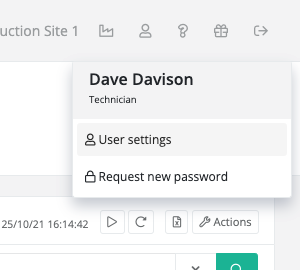
In the users settings screen, click on the action button in the upper right corner and select ‘Activate MFA’. When MFA has already been activated, you will see ‘Deactivate MFA’ as option in the dropdown menu.

Once you click the button in the dropdown to activate or deactivate the MFA mechanism, an MFA code will be sent to your e-mail address. This code should be provided on the screen before the MFA mechanism will become active or inactive.
