
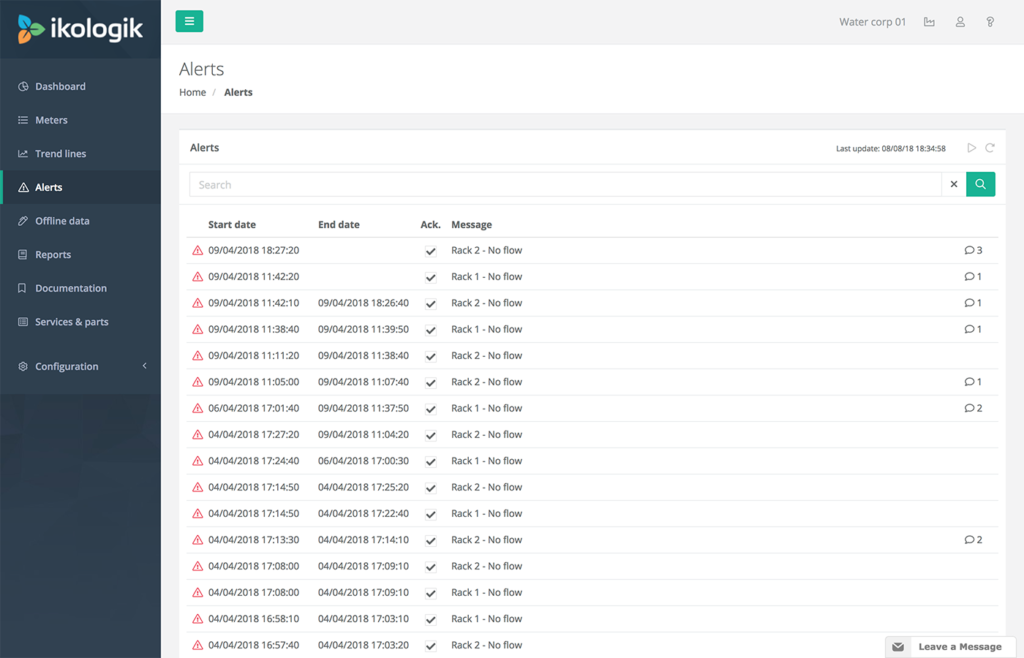
In the Alerts module, you can view and search in the complete list of alerts that are generated for the current installation.
Auto-reload
By default, the alert list is not reloaded automatically. To enable the auto-reload, press the play button on the upper-right corner. The date and time of the last reload are displayed next to the auto-reload button.
Alert acknowledgement
When an alert is generated, the acknowledged field is marked depending on the auto-acknowledgement settings of the alert type. When auto-acknowledged has been enabled for the alert type, the alert is acknowledged upon creation, if not, a user should manually acknowledge the alerts.
Comments
If a comment is added to an alert, a text balloon appears on the right-hand side of the alert. The number of comments associated with the alert is displayed together with the text balloon.
By clicking on an alert line, the comment screen appears. The comment screen contains a list of messages related to the selected alert. For each message the date, time and username of the user who entered the comment entry are displayed. Comments created by yourself are aligned on the right-hand side. Comments from other users are aligned left.